
If you have ever used a laptop, you probably know what a touchpad is in a laptop. But do you know how it works and why it is important? Let's figure this out together.
What is a touchpad?
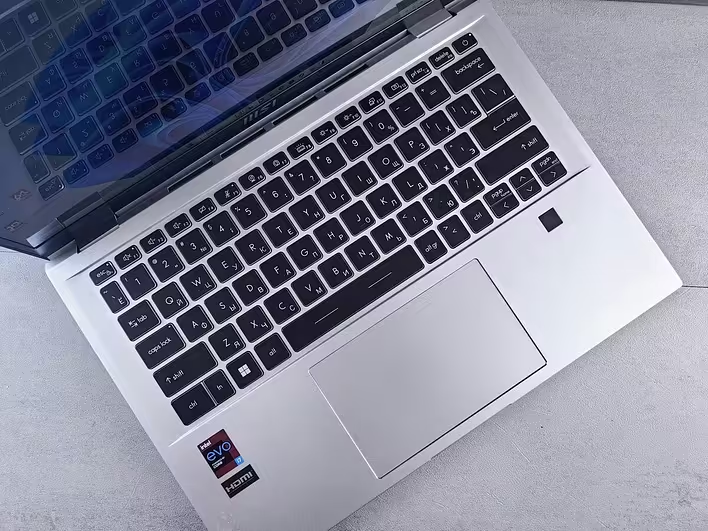
A touchpad is a touch-sensitive panel that allows you to control the cursor on the laptop screen. It is also known as a trackpad or touch panel. The touchpad has become a great alternative to a traditional mouse, especially for those who are always on the go. You can find it right below the laptop keyboard — it is a rectangular area with a small surface on which you can perform various gestures.
How does a touchpad work?
The touchpad works using touch technology that detects finger contact with its surface. Its operation is based on capacitive or resistive sensors that respond to changes in the electric field or pressure. When you touch the touchpad, the sensors detect the point of contact and transmit this information to the computer. This allows you to perform various actions: move the cursor, click buttons, or even perform complex gestures.
Why is the touchpad so popular?
Touchpads have become popular due to their convenience and functionality. Here are a few reasons why they are so popular:
- Compactness: The touchpad takes up much less space than a mouse.
- Mobility: You can work with a laptop anywhere without the need to carry a mouse.
- Functionality: Modern touchpads support multi-touch gestures, such as two-finger scrolling or zooming in/out.
- Energy efficiency: Touchpads consume less power compared to wireless mice.
How to use a touchpad effectively?
To get the most out of your touchpad, use these tips:
- Regularly clean the surface: Dust and dirt can affect sensitivity.
- Adjust sensitivity: In your operating system settings, you can change the touchpad sensitivity.
- Use gestures: Most modern operating systems support gestures for quick task execution.
Interesting facts about touchpads
- The first touchpad was developed in 1988 by Apple for its PowerBook laptop.
- Modern touchpads can distinguish up to 10 touch points simultaneously.
- Some manufacturers offer touchpads with a glass surface for better sensitivity.
In conclusion, if you didn't know what a touchpad is in a laptop, I hope this article helped you understand. A touchpad is not just a replacement for a mouse; it is a tool that makes your work with a laptop more comfortable and efficient. So next time you open your laptop, pay attention to this small but important component!