
This content has been automatically translated from Ukrainian.
Every day we log into email, social networks, online banking, online stores, and other services. Almost everywhere, you need to enter a login and password for this. Although these words are familiar to most users, they are often confused or not fully understood in terms of the role each plays.
In simple terms, the login helps the system identify who is trying to access the account, while the password confirms that it is indeed the owner.
Together, the login and password are the most common method of user authentication. After successful verification, the system authorizes the user and grants them access to their account and permitted functions.
What is a login
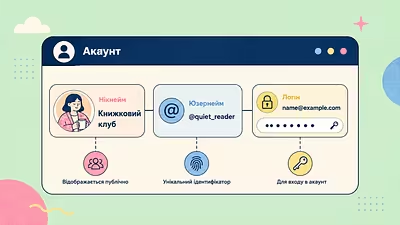
Login is the user identifier that the system uses to find their account. Within a single service, the login must be unique so that the system can accurately distinguish one user from another.
Depending on the service, the login can be:
- an email address;
- a mobile phone number;
- a username (nickname);
- a special identifier created during registration.
For example, when logging into email, the login is most often the email address. In social networks, you can use an email, phone number, or nickname to log in.
The login itself is not secret information. It can be compared to a person's name: it simply helps the system find the correct account.
Examples of logins
Depending on the service, the login can look different. For example:Regardless of the format, the login serves the same function — it helps the system find your account.
- [email protected] — an email address;
- +380671234567 — a mobile phone number;
- Petro2026 — a username (nickname);
- student_14582 — a service identifier at an educational institution or company.
What is a password
Password is a secret combination of characters that confirms that you are the owner of the account.
Passwords can consist of letters, numbers, and special characters. The longer and more complex they are, the harder they are to guess by outsiders or special programs.
Unlike the login, the password should not be shared with anyone. If another person learns your password, they can access personal data, correspondence, photos, documents, or even banking services.
In modern online services, passwords are usually not stored in plain text. Instead, special cryptographic protection methods are used, so even service employees typically cannot see your actual password.
That is why modern services recommend using a unique password for each account.
How does a login differ from a password
Although these concepts are almost always used together, they serve different functions.
The login is needed for the system to find your account. The password is needed to confirm that the owner is the one trying to access it.
In simpler terms:
- the login answers the question “Who are you?”;
- the password answers the question “Is it really you?”.
That is why the same login without the correct password does not allow access to the account.
What is authorization and authentication
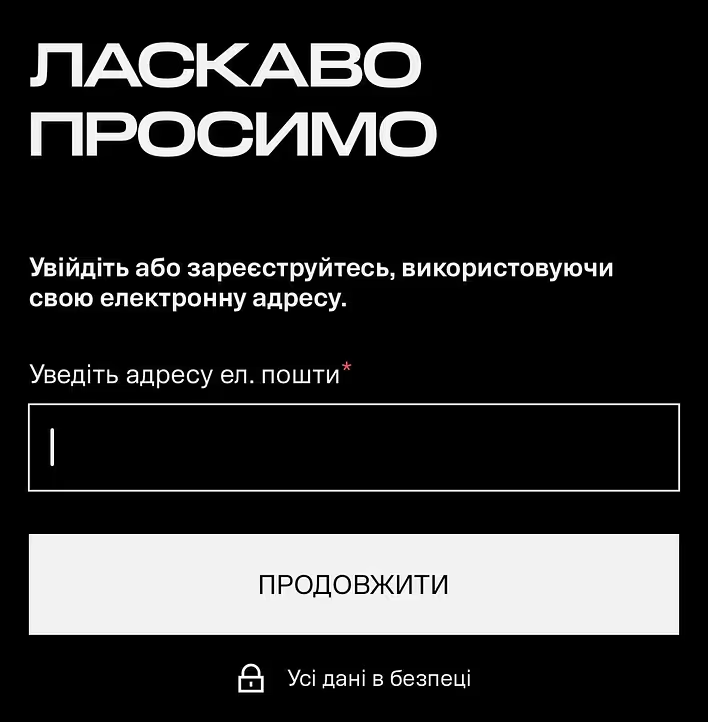
After entering the login and password, the system first performs authentication — it checks whether the user is indeed the owner of the account. If the verification is successful, authorization occurs — the system grants access to permitted data and functions.
In everyday speech, these terms are often used as synonyms, but there is a difference between them:
- authentication — verifying the user's identity;
- authorization — granting access rights after successful verification.
Do not confuse authorization with registration. During registration, a new account is created, while authorization occurs each time a user logs into an existing account.
Can a login be an email?
Yes. In most modern services, the email address is used as the login.
This is convenient, as the user does not need to remember a separate name for logging in. At the same time, some sites allow using a phone number, nickname, or special identifier as a login.
If you are unsure what to enter, pay attention to the hint in the login field. Labels like “Email,” “E-mail,” “Phone or e-mail,” or “Username” will indicate what data the service expects.
How to create a strong password
The password protects your account from unauthorized access, so it should be not only convenient for you but also difficult to guess.
To make your password strong:
- use at least 12–16 characters;
- combine uppercase and lowercase letters, numbers, and special characters;
- do not use your name, date of birth, or phone number;
- create a separate password for each important service.
If complex passwords are hard to remember, use a password manager. Such programs not only securely store logins and passwords but can also automatically generate long random passwords.
Why you shouldn’t use the same password everywhere
Using the same password for different sites is one of the most common mistakes.
If the password becomes known to attackers due to a data breach on one service, they may try to use it to access your other accounts.
That is why it is advisable to create a separate password for each important service.
What is two-factor authentication
Two-factor authentication (2FA) is an additional layer of account protection.
After entering the login and password, you need to confirm your identity in another way: for example, by entering a one-time code from an authentication app, SMS, or email.
Even if someone learns your password, without the second confirmation step, they usually cannot log into the account.
What to do if you forgot your login or password
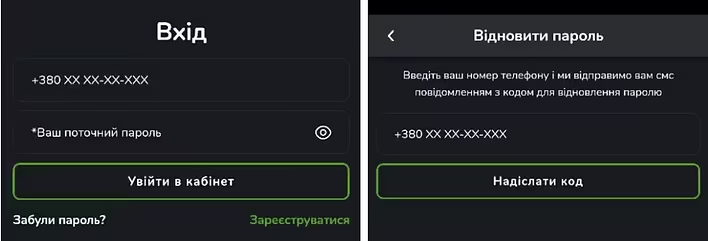
If you cannot log into your account, do not rush to create a new one.
If you forgot your password, use the “Forgot Password?” or “Reset Password” function. If you don’t remember your login, try to recall the email address or phone number you used during registration. If necessary, contact the service's support team.
Restore access only through the official website or app.
How to safely store logins and passwords
If you have many accounts, the best solution is a password manager.
It is also worth following simple rules:
- do not write passwords on pieces of paper near the computer;
- do not store them in unprotected text files;
- do not send passwords in messengers or via email;
- change your password if you suspect it has become known to outsiders or the service has reported a data breach.
Frequently Asked Questions
Is login and password the same thing?
No. The login identifies the user, while the password confirms their identity.
Can one email be used for different sites?
Yes. One email address can be a login for many different services. The main thing is to use different passwords.
Can you change your login?
It depends on the specific service. Some allow changing the email address or username, while others do not.
Should you change your password regularly?
If the password is strong and there are no signs of compromise, it does not need to be changed regularly. However, it should be updated immediately if there is suspicion of a data breach or unauthorized access.
Why does the site say “Incorrect login or password”?
The reason may be an error during entry, incorrect keyboard layout, Caps Lock being on, a changed password, or entering a login that does not correspond to this account.