

This content has been automatically translated from Ukrainian.
Authentication, authorization, and verification describe different checks, although in the interfaces of websites and applications, they often occur almost simultaneously. Because of this, the words are easily perceived as synonyms.
The easiest way to distinguish them is by three questions:
Authentication — who are you?Authorization — what are you allowed to do?Verification — is certain information correct and reliable?
For example, when you log into your email with a password, the system authenticates you. When, after logging in, it allows you to read your own inbox but not someone else's, authorization is at work. And when, during registration, it sends a link to the specified email address to verify that you indeed have access to it, that is verification.
What is authentication
Authentication is the process of confirming that a user, device, or system is indeed who or what it claims to be.
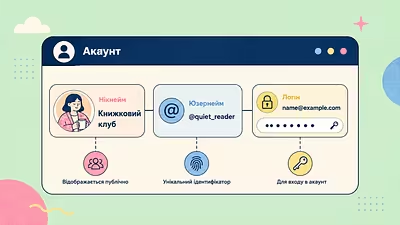
When a person enters username and password, the username usually informs the system, which account it is trying to access, while the password helps confirm the right to use that account.
Authentication can occur not only through a password. It can use:
- one-time codes;
- authentication apps;
- hardware security keys;
- fingerprints or facial recognition;
- passkeys;
- a combination of several methods.
If, after entering the password, the site additionally asks for a code from an app or confirmation on another device, it refers to multi-factor authentication.
Example with a social network
You open Instagram, Facebook, or another social network and enter your login details. The service checks them and determines whether it can indeed grant you access to the corresponding account.
This is authentication.
So here the main question is not "what functions are available to you?", but "can we confirm that this is indeed the owner or legitimate user of this account?".
What is authorization
Authorization determines what data, functions, or actions an already recognized user has access to.
It usually occurs after authentication.
Imagine a work service used by employees of a company. Both the manager, the accountant, and the administrator can successfully log into their accounts. Thus, all three have passed authentication.
But after logging in, they can see different sections:
the manager — clients and tasks;
the accountant — invoices and payments;
the administrator — user settings and access rights.
The system already knows who has logged in, and now decides what this person is allowed to do. This is authorization.
Example with a bank
You log into mobile banking with a PIN code, biometrics, or another method — authentication occurs.
After that, the system gives you access to your accounts, cards, and transactions, but not to other clients' accounts. Additionally, certain functions may only be available to specific users or require additional rights.
This is already authorization.
Therefore, the phrase "the user has logged into the site" is understandable in everyday language, but technically not always accurate. The process of confirming identity during login is more correctly referred to as authentication, while authorization refers to the verification of rights afterward.
What is verification
Verification is a broader concept. It is the process of checking whether certain data, statements, or objects are correct, genuine, or meet established requirements.
In digital services, verification most commonly involves:
email;
phone number;
identity;
payment card;
documents;
account or organization.
For example, after registration, the site sends an email with a "Confirm email" button. By clicking it, the user proves that they have access to this email inbox.
The system does not necessarily establish the full identity of the person. It only verifies a specific statement: "the user controls this email address".
This is email verification.
Verification of identity at a bank
The difference is especially clear in the example of banking services.
When opening an account, the bank may ask for a passport, take a photo of the face, conduct a video verification, or obtain other data necessary to establish the client's identity.
This is identity verification.
When an already registered client opens the banking app the next day and confirms their login with biometrics or a code, that is authentication.
And when the system determines which accounts and transactions are available to them, that is authorization.
The three processes can relate to one user but perform different tasks.
Why an SMS code sometimes means different things
Confusion arises also because the same technology can be used for different processes.
For example, a site sends an SMS with a code.
If this occurs during registration to verify whether the user indeed has access to the specified number, the code is used for phone number verification.
If the code is received during login to an already created account as an additional confirmation, it participates in authentication.
Therefore, it is not advisable to define the term solely by the method of verification. Its purpose matters.
Authentication, authorization, and verification in one example
Let's consider registration and subsequent work in a corporate service.
An employee creates an account and receives an email with a link to confirm their work email address. This is verification.
The next day, they enter their username and password, and then confirm their login in the authentication app. This is authentication.
After logging in, the service sees that the employee has the role of editor, so it allows creating and modifying materials but does not grant access to manage the company's payment data. This is authorization.
Thus, the difference becomes much clearer:
And where is the username and password here
Username, password, authentication, and authorization often get lumped together, even though they denote different things.
Username helps the system understand which account is being referred to. This can be a username, email, phone number, or a specific identifier.
Password is a secret that the user uses to confirm their right to access.
Checking this data is part of authentication.
Only after a successful login can the system conduct authorization — verifying the user's role, rights, and permitted actions.
That is why it is technically more accurate to say not "authorization by username and password," but "authentication by username and password", although in interfaces and everyday speech, the term "authorization" has long been used as a general term for logging into a system.
How to remember the difference
If the system checks your affiliation with the account — that is authentication.
If it already knows who you are and checks your rights — that is authorization.
If it needs to confirm the validity of specific information — an email address, phone number, document, or identity — that is verification.
Sometimes all three processes fit into a few seconds and appear to the user as one ordinary "login." But for the system, these are different stages with different tasks.